Friday, 13 July 2018

How to Root an Android Phone or Tablet Without a Computer 2018 Guide


Why do you Need to Root your Phone?


For average user rooting your android phone is not necessary but for that heavy or curious user that want to explore more on what your Android phone can do. Some reasons involve are like the following:


Change your Android OS Version to the latest or later one.


Install apps to block ads.


Ability to uninstall unnecessary apps that come with the phone after you bought it.


Tweak startup logos and other cool stuff.


Rooting your Android device will give you the ability to use Game Killer App this app can hack games/apps money, gold, coins or any resources.
Requirements


An Android device (phone or tablet)


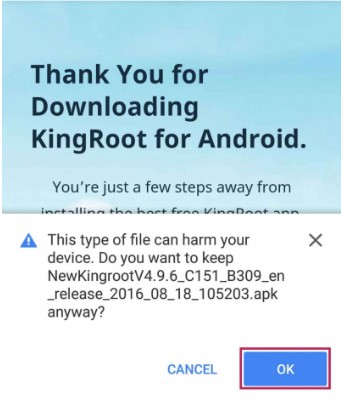
Download KingRoot app for Android (After you download this app you might encounter a warning from your browser that this app is malicious and might harm your phone. This is false positive, but anyway use at your own risk) See image below.


Up to 50% of battery.
Start Rooting your Android Device


After you download the Kingroot app. You may install it now.


Take note that if you are installing an app outside Google Playstore you will a warning about “Install Blocked” to overcome this simply click on the settings>security> and tick on the “Install from unknown sources”


The installation will begin its process.


After the installation, all you need to do is click on the “START ROOT” process.


Wait for a few minutes…


Done! Check out the image below.
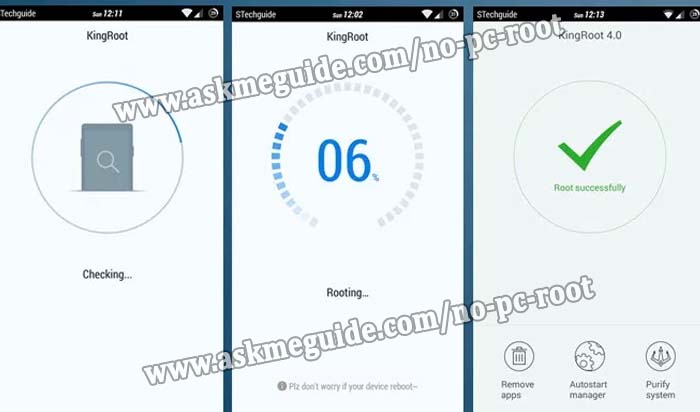


And that’s how you android root without a computer! To check out that your phone is truly rooted. Please install Root Checker app from Google Play Store.


You can also visit this page http://askmeguide.com/tutorial-how-to-root-android-phone-without-pc/ for a detailed the same tutorial. Rooting your Android device will give you full control over your phone or tablet and will give you extra space for expansion that normal android phone cannot do. However, a rooted Android phone will void any warranty you have on your phone. Some phone will do not support to be rooted as well.Sponsor Ads:


Gihosoft Free iPhone Data Recovery is a professional iPhone Data Recovery software to get back all your lost text message, photo, video, call history, note, contact and more from iPhone/iPad/iPod Touch.

Gihosoft Android data recovery Free is a super awesome software specialized in Android file recovery. With this program, you are able to recover deleted photos, music, videos, messages, contacts, call logs, WhatsApp messages, Viber chat history and more from Samsung, Huawei, LG, HTC, Motorola, Google, Oneplus, Sony, Lenovo, ZTE and other Android devices directly. Meanwhile, this Android data recovery software is available for both Windows and Mac platforms.

Wednesday, 13 June 2018

Does a Factory Reset or iOS Updating Remove Spyware? - Nope!

Does a Factory Reset or iOS Updating Remove Spyware? - Nope!
Factory Reset


A lot of people think that performing a factory reset will remove the spyware from their iPhone. This is not correct. While factory reset does remove all your data including the spyware app(s) from the device, there is still a possibility that the spyware will be installed again. The reason behind this is that the usual factory reset does not remove data permanently and some remnants of the stubborn spyware app still remain when you reset the device.


Another reason is that most people backup their iDevices before resetting them. When the data is backed up, the spyware app also gets backed up to iCloud or iTunes. And when you restore from that backup, the parts of the spyware app are also restored. Hence you are likely to find these remnants of the spyware app if you rescan the device with a spyware scanning software.
iOS Updating


Updating your iPhone’s firmware also has a similar effect. However, it is relatively less extreme. Your data and apps are not removed during a firmware update, but there are chances that the spyware will be removed.


Sponsor Ads:
Gihosoft iPhone Data Recovery is a professional iPhone Data Recovery software to get back all your lost text message, photo, video, call history, note, contact and more from iPhone/iPad/iPod Touch. It offers a full solution to recover your lost data in different tough situations. Besides recovering data directly from iPhone, iPad and iPod touch, it also allows you to recover data from iCloud and iTunes backup files.

APPLE TOUTS UPDATED APPLE BOOKS APP, COMING THIS SEPTEMBER, IN A PRESS RELEASE

Apple announced the major updates coming to Apple Books at WWDC. However, today the company has released a press release showing off the changes made. Apple has dropped the previous ‘iBooks’ title and replaced it with ‘Apple Books’. Which is displayed as ‘Books’ in iOS 12.
Apple touts the Apple Books app as easy-to-use and invites people to discover and enjoy books with the new app. The app is entirely redesigned to make enjoying books and discoverability easier. Also with the ability to listen to audiobooks effortlessly for iOS users.Gihosoft iPhone Data Recovery Free:https://www.gihosoft.com/iphone-data-recovery-free.html

Eddy Cue said:

“Apple Books will inspire a love of reading — it puts a world of books and audiobooks right at your fingertips, whether you want to dive into your favorite story for a couple of minutes or a few hours,” said Eddy Cue, Apple’s senior vice president of Internet Software & Services. “This is our biggest books redesign ever, and we hope this beautiful app inspires both customers and authors alike.”Gihosoft iPhone Data Recovery Free:https://www.gihosoft.com/iphone-data-recovery-free.html

‘Reading Now’ tab:

The Reading Now tab is what Apple describes at the new home to the books you are currently reading or listening to. Apple has introduced a new feature called ‘Want to Read’, which allows you to conveniently keep a wishlist of books you hear about, from memory or word of mouth.

‘Audiobooks’ tab:

Apple also is prominent about the fact that they’ve introduced a new Audiobooks tab for the first time ever, so you can listen to books on the go with your iPhone or iPad or from the comfort of your own home. You will also be able to listen to Audiobooks via CarPlay.

‘Book Store’ tab:

The Book Store tab is pretty self-explanatory. In this tab, you will be able to browse for books including Staff Picks, Editorial Collections, Special Offers, Top Charts and Free books. The all-new Apple Books design now allows the user to swipe between books. Alongside, improving discoverability.

‘Library’ tab:

The Library tab is the home for your collection of books. With a large easy-to-see cover art. Showing the books you’ve downloaded to your device and a Finished section showing the books you have finished reading in the past – which is a pretty nifty feature.

Availability of Apple Books:

Apple Books will launch this fall according to Apple. Most likely towards the end of September when Apple usually releases the next generation of softwares.  The Book Store will be available in 51 countries and free books available in 155 countries. The redesign of the predecessor iBooks was long overdue so all these changes are welcome with open arms.

Sunday, 10 June 2018

iCloud Says Not Enough Storage but There Is?

iCloud Says Not Enough Storage but There Is?
1. Check with Apple


When iCloud says not enough storage but there is, please ensure if there is a problem with iCloud server. Check with your Apple server and get to know about any problem. If there is a problem with the iCloud server or iCloud server is under maintenance, the iCloud storage information will not be updated in time or updated correctly.
2. Delete the Unnecessary Data using iCloud Storage


When there is a lot of space and still iCloud says not enough storage, the next tip is to check the iCloud storage and see what data type is consuming more space. Delete that particular data and make space. To execute this, open 'Settings' > 'Apple ID (your name)' > 'iCloud' > 'Manage Storage'. Now check the data types and delete accordingly.


3. Check the Used Storage on Your iPhone


It is possible that your iPhone is using more storage than iCloud available storage and that's why iCloud says not enough storage when there is. For this, it is suggested to erase some unwanted data and apps in your device. Go to 'Settings' > 'General' > 'iPhone Storage' and check what apps are eating more storage and how much. Remove them accordingly.


Do you like this story?


Sponsor Ads:
Gihosoft iPhone Data Recovery is a professional iPhone Data Recovery software to get back all your lost text message, photo, video, call history, note, contact and more from iPhone/iPad/iPod Touch. It offers a full solution to recover your lost data in different tough situations. Besides recovering data directly from iPhone, iPad and iPod touch, it also allows you to recover data from iCloud and iTunes backup files.

TCL vs. Hisense

  TCL vs. Hisense TCL and Hisense are both  Chinese electronics companies  that make televisions and other appliances. Here are some key dif...